Z-WAMP Server Pack
Z-WAMP is a lightweight zero-install Web server package that runs on Windows. The project aims to provide the latest production/stable versions of Apache, MySQL, PHP, Adminer, MiniPerl, MongoDB, SQLite, and Alternative PHP Cache (APC) to boost server performance.


The latest release of Z-WAMP (Version 2.2.1) contains:-
- Apache 2.4.3
- MySQL 5.6.10
- PHP 5.4.12
- MiniPerl 5.14.2
- MongoDB 2.2.3 (PHP 1.3.4 driver)
- APC 3.1.13
- XCache 3.0.0
- XDebug 2.2.1
- Adminer 3.5.1
- PHP MongoDB Admin
Download
Head over to the Z-WAMP project site to download the server pack. Grab the flavor that suits your operating system (32-bit/i386 or 64-bit/x86_64). The full version contains the latest Apache, MongoDB, MySQL, and PHP manuals for offline use.
All users are encouraged to upgrade to this new release. The latest version contains lots of new features, usability improvements, bug fixes, and security updates to the Z-WAMP components.
Usage
Remove all traces of other WAMP stacks installed on your Windows PC to prevent conflicts. Double check your PATH environment variable. By default, Apache uses TCP port 80 for incoming HTTP requests. Configure other software, e.g. Skype, to use alternative TCP ports.
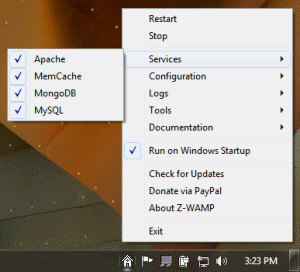
To start using the software, simply unpack the ZIP archive in any directory on your hard disk - something like C:\Program Files (x86)\ZWAMP or C:\Program Files\ZWAMP. You can also transfer the files to a USB stick. If you prefer a non-portable setup, create a shortcut to zwamp.exe on your desktop, quick launch bar or the Start Menu, double-click the shortcut and you're done with the setup! Z-WAMP will create a virtual drive on your computer (Z: usually) and an icon should appear immediately in your system tray. Right-click on this icon to access all features of the Z-WAMP stack.
Once the Web server is up, you can drop all your Web site files in the /web directory. Type http://localhost in your Web browser's address bar and you now have a working Web site.
If you want Z-WAMP to run automatically every time you log into your computer, simply enable the "Run on Windows startup" option.
If you wish to uninstall the package, it's as simple as deleting the folder where you installed it.
Note: Please set up a MySQL root account and password as soon as you can. See the MySQL online documentation for details.
Shameless Plug
If you're an avid PHP developer, consider the Fat-Free Framework for your next Web project. Fat-Free (also called F3) is a powerful yet easy-to-use PHP micro-framework designed to help you build dynamic and robust Web applications - fast! Unlike other PHP frameworks, Fat-Free aims to be usable, not usual. Visit the Fat-Free project site at http://fatfree.sourceforge.net.
Support Us
If you feel that the Z-WAMP Server Pack is one great addition to your Web development arsenal and it saves you a lot of time and money, please consider making a donation to the project. Aside from motivating the people who make this package available to the world, it also helps keep the project alive and up-to-date.